
Reporting An Inaccurate Response, Reference, Or Personalization

- Purpose
- How To Report Inaccurate Content
- What Happens After You Submit
- Important To Remember
- Related Articles
Purpose
This article explains how to flag a Consult response, Discover reference, or Research card in Jiro that appears inaccurate. Submitting a report gives the Jiro team visibility into accuracy issues and informs ongoing improvements across the platform.
How To Report Inaccurate Content
Feedback controls are available throughout Jiro, on Consult responses, literature references in Discover, and personalized content including Metrics and Spotlights. The steps below apply across all three areas.
- Locate the thumbs-up and thumbs-down icons associated with the Consult response, Discover reference, or Research you want to flag. Location of the icons vary depending on the feature - in Consult you will find them at the bottom of the response.
- Select the thumbs-down icon.
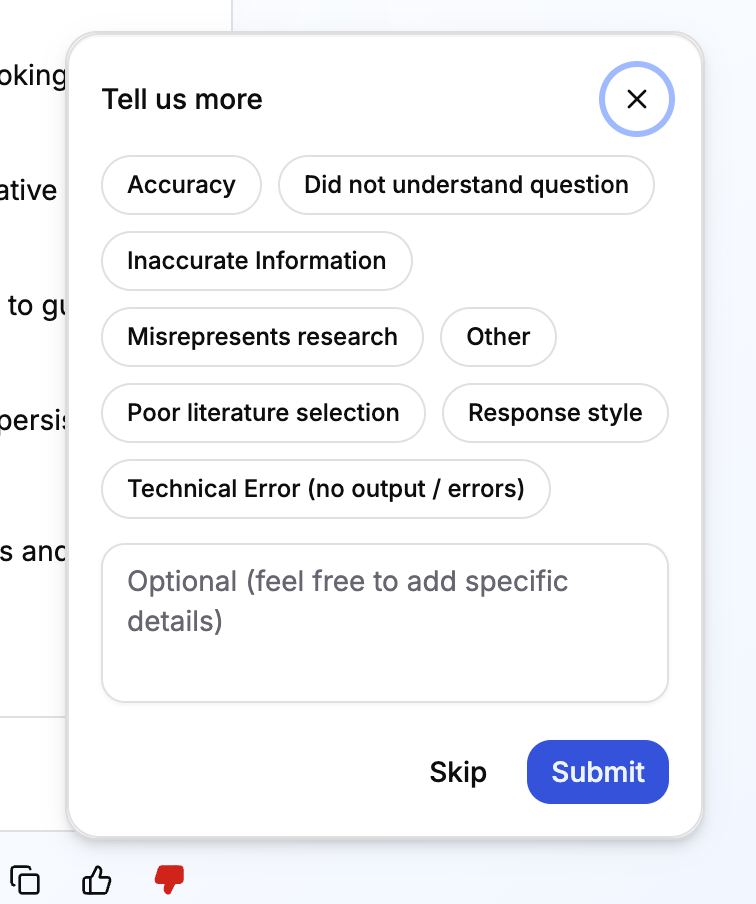
- A feedback panel will open. Select any categories that describe the inaccuracy (optional).
- Enter a written comment specifying what appears incorrect (optional).
- Submit your feedback.
What Happens After You Submit
Your report is received by the Jiro team. Feedback is reviewed to identify recurring accuracy issues around responses, references, and personalized content. Submitting feedback does not immediately update or remove the content you flagged. Individual submissions do not generate a direct response, but patterns across submissions are reviewed by the product team on a regular basis.
Important To Remember
- The feedback control is available on Consult responses, Discover literature articles, Metrics, and Spotlights through the thumbs up and down icons.
- Both thumbs up and thumbs down submissions are recorded. Positive feedback is equally useful and helps confirm features are working as intended.
- Category selection and written comments are optional but increase the usefulness of your report.