
Limitations & Safety Guardrails
- Purpose
- What Consult Is Designed For
- Response Accuracy
- Real-World Data Caveats
- Patient Privacy Guardrails
- How to Flag An Inaccurate Response
- Important To Remember
- Related Articles
Purpose
This article describes what Consult is and is not designed to do, and explains the guardrails built into the feature to support safe and appropriate use.
What Consult Is Designed For
Consult is a clinical question-and-answer interface that surfaces evidence-grounded responses to inform physician judgment. It is intended as a reference tool, for retrieving and synthesizing peer-reviewed literature and real-world data relevant to a clinical question, in the context of an active patient encounter or clinical inquiry.
Consult is not designed to:
- Substitute for clinical judgment, formal diagnosis, or treatment decisions
- Serve as a source of legally binding clinical documentation
- Replace specialist consultation or collegial clinical discussion
- Provide real-time clinical information or current drug shortage data
- Answer queries regarding patient data and other PHI
Every Consult response is meant to support a physician's own assessment, not replace it.
Response Accuracy
A disclosure appears at the bottom of every Consult response: "By Jiro AI; there could be mistakes. Learn more." The learn more link opens Jiro's full disclosure at jirohealth.com/ai-disclosure.

Clinicians should verify clinical details, including medication doses, diagnostic criteria, and evidence quality, against primary sources before applying them to patient care. Accuracy improvements are ongoing, and clinician feedback directly informs that process.
Real-World Data Caveats
When a response includes data derived from claims, such as prescribing rates, utilization patterns, or peer comparisons, the following limitations apply:
- Data coverage. The depth of personalization depends on the volume of claims data associated with your NPI. When coverage is limited, Jiro falls back to specialty or location-level data rather than NPI-level data.
- Cohort suppression. In accordance with CMS policy, patient cohort counts between 1 and 10 are never displayed. When suppression applies, the affected data point is excluded from the response without indication to the physician.
- Claims data lag. Real-world data presented in graphs reflects processed and attributed claims. Recent clinical activity may not yet be represented in the data underlying a response.
Patient Privacy Guardrails
Patient anonymity standards apply to all real-world data surfaced in Consult responses. Individual patient-level data is not used in ways that could permit re-identification. These standards align with applicable HIPAA requirements governing de-identification and small population reporting.
How to Flag An Inaccurate Response
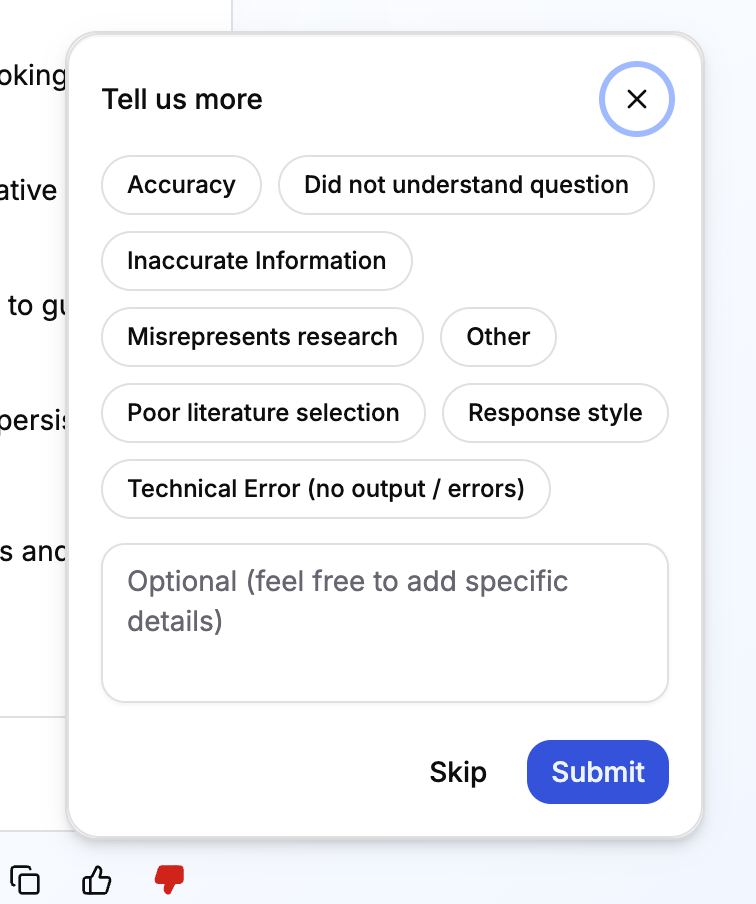
Each Consult response includes thumbs-up and thumbs-down controls. To report a concern:
- Select the thumbs-down icon below the response.
- Select the category that best describes the issue: Poor literature selection, Inaccurate information, Misrepresents research, Response style, Did not understand question, Technical error, or Other.
- Add an optional written comment and submit.
Feedback is reviewed by the Jiro clinical team and used to improve response quality. For detailed guidance, see How Consult Works.
Important To Remember
- Both real-world data charts and text-based personalization can be disabled independently of each other in Consult if data quality concerns arise. When a chart is unavailable, personalized context continues to surface in response text where available.
- Consult is not meant to replace your clinical judgement
- Do not enter PHI or PII into Consult. Patient anonymity standards established by HIPAA apply to data surfaced in Consult.