
How Consult Works
- Overview
- Query & Response Generation
- Response Structure
- Data Sources & Response Timing
- Giving Feedback In Consult
- Copying Responses
- Sharing A Response
- Important To Remember
- Related Articles
Overview
This article describes how Consult processes your clinical questions, from the moment you submit a query through to the real-world data, patient outcomes, referenced scientific literature, medical textbooks, responses, and supporting references you receive.
Query & Response Generation
- Submit your question. Enter your clinical question in the Consult input field and click the blue send arrow or click enter.

- Evidence retrieval. Consult searches across curated clinical sources, including published guidelines, peer-reviewed literature, foundational medical textbooks and real-world clinical data.
- Practice context applied. Context derived from your NPI, specialty, and real-world practice data is incorporated alongside the evidence-based response to surface patterns relevant to your practice.
- Response delivered. A clinical summary and supporting review are generated and displayed in the Consult interface to support your clinical judgement.
- References listed. Cited sources appear at the bottom of each response for your review.
- History saved. Consult saves your question as a part of a new thread. You can access it or view previous threads by clicking the history icon on the top right of the page.
- AMA PRA Category 1 credit(s)™ earned. Clicking the “Claim CME Credit” button at the bottom of a Consult response and completing the attestation statement awards credits to your profile.
- Feedback captured. Rate the helpfulness of each response using the thumbs up or thumbs down buttons. Feedback supports ongoing quality improvements.
Response Structure
Guidelines
Consult begins a response by providing clinical guidelines to the user along with a source.
Clinical Answer with Sources
A clinical answer to questions are given to users and broken into relevant sections based on the question. Within a response, sources are labeled by the number they appear following a claim. Sources are available in the reference drawer (book icon at bottom right corner of response), or by clicking (on the web) or tapping (on iOS) the number associated with a source.
Personalization
The user’s NPI provides their real-world data and practice information while Jiro’s database provides de-identified, aggregated data showing how clinicians in your specialty, region, or practice setting approach the same clinical scenario. The result, when data is available, are Peer Cohort graphs and how to apply a response to your practice.
Data Sources & Response Timing
Sources
- Peer-reviewed medical literature
- Real-world practice data
- Updated medical guidelines
- Medical textbooks
- Drug monographs and interaction data
- Gold standard point of care clinical reference partners
References are sourced from peer-reviewed literature databases provided via licensing partners such as NEJM and Wolters Kluwer, as well as PubMed. The presence of a citation reflects that a claim is supported by that source, physicians should assess the quality and applicability of each study independently.
Response timing
Consult targets a response time of approximately 12 seconds per query.
Giving Feedback In Consult
Feedback icons are available below a Consult response. Providing feedback gives Jiro insight into where Consult is performing as intended, improvements to accuracy issues, and helps inform ongoing improvements to Consult.
- Locate the thumbs-up and thumbs-down icons below a Consult response.
- Select the thumbs-up or thumbs-down icon.
- An optional feedback panel will open. Select any categories that describe your Consult experience.
- You also have the option to write comment specifying your Consult session.
-
Submit your feedback.
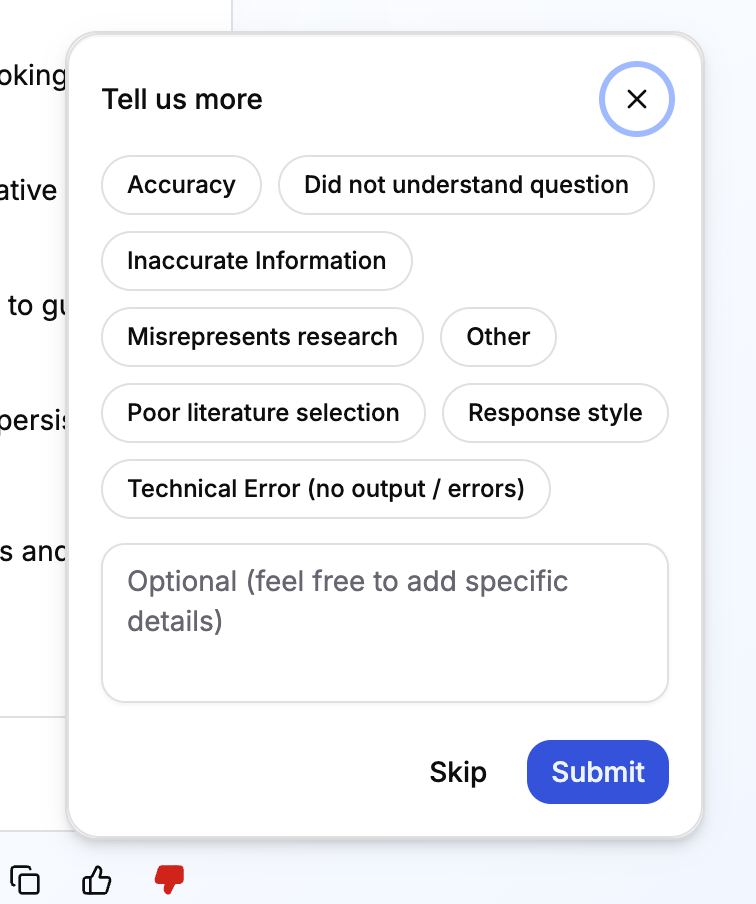
Any additional information provided through categories or written comments are recorded and useful to Jiro. Feedback does not immediately update or remove content or generate a direct response, but patterns across submissions are reviewed by the support team on a regular basis.
Copying Responses
Consult includes a built-in copy tool at the bottom of any given response. To copy a response:
- Locate the copy icon at the bottom of your Consult response.
- Click the icon and paste into a document, clinical note, or messaging application.
For smaller selections, you can select the text using your cursor and use the standard keyboard shortcut for your device (Command + C on macOS; Ctrl + C on Windows). In text citation numbers are included but not the actual referenced piece of literature if selected or if the built-in copy tool is used but can be removed.

Sharing A Response
Consult does not currently include a native share or permalink feature for individual responses. To share a response with a colleague:
- Copy the relevant text as described above.
- Paste into an email, clinical note, or institutional messaging application.
Important To Remember
- Personalized insights like Peer Cohort graphs draw on your NPI along with Jiro's de-identified, aggregated data, they only appear when that data is available.
- Submitting feedback doesn't immediately change or remove the content you flagged, patterns across submissions are reviewed regularly by the product team.
- There's no built-in share or permalink feature for individual responses.
- Completing the acknowledgement and. attestation statement after clicking "Claim CME Credit" is what awards AMA PRA Category 1 credit(s)™ to your profile.