
How Jiro Is Personalized For You
- Overview
- Your NPI As The Foundation
- How Your Patients Are Identified
- How Metrics Are Selected For You
- How Spotlights Are Generated
- How Peer Benchmarks Are Constructed
- How Personalization Adapts To Data Coverage
- How Consult Is Personalized
- Important To Remember
- Related Articles
Overview
Jiro delivers practice intelligence specific to you through your existing real-world data, your patients, your clinical patterns, your specialty context. This article explains how that personalization works at each layer of the platform, from the data that anchors it to the signals it surfaces.
Your NPI As The Foundation
Every layer of personalization in Jiro begins with your NPI. When your account is created, Jiro links your NPI to the underlying real-world dataset and begins identifying the clinical activity associated with you as an individual practitioner. No manual data entry, EHR integration, or panel upload is required. Your NPI serves as the anchor that connects your account to the real-world data that powers the platform.
How Your Patients Are Identified
Your attributed patient panel is derived from real-world data in which your NPI appears as the ordering, performing, or rendering physician. The specific attribution logic varies by service context. Professional and institutional records, for example, follow different attribution rules, but the principle is consistent: patients are attributed to you based on documented clinical responsibility as reflected in the underlying record.
Attribution is reassessed on a rolling basis as new data becomes available. Your attributed panel at any given time reflects activity within the active measurement period, typically the most recent 12 months.
Because attribution is based on how clinical activity is documented, patients you treated whose records were submitted under a group or facility NPI, without individual provider attribution, may not appear in your panel. This is a structural characteristic of how clinical data is submitted, not a limitation specific to Jiro.
How Metrics Are Selected For You
Jiro surfaces a default set of metrics relevant to your specialty. Specialty is determined from your selection at registration and used to populate the metrics most likely to reflect the clinical, operational, and financial dimensions of your practice. A cardiologist and an emergency physician, for example, see different default metric sets reflecting the different care contexts and population patterns relevant to each specialty.
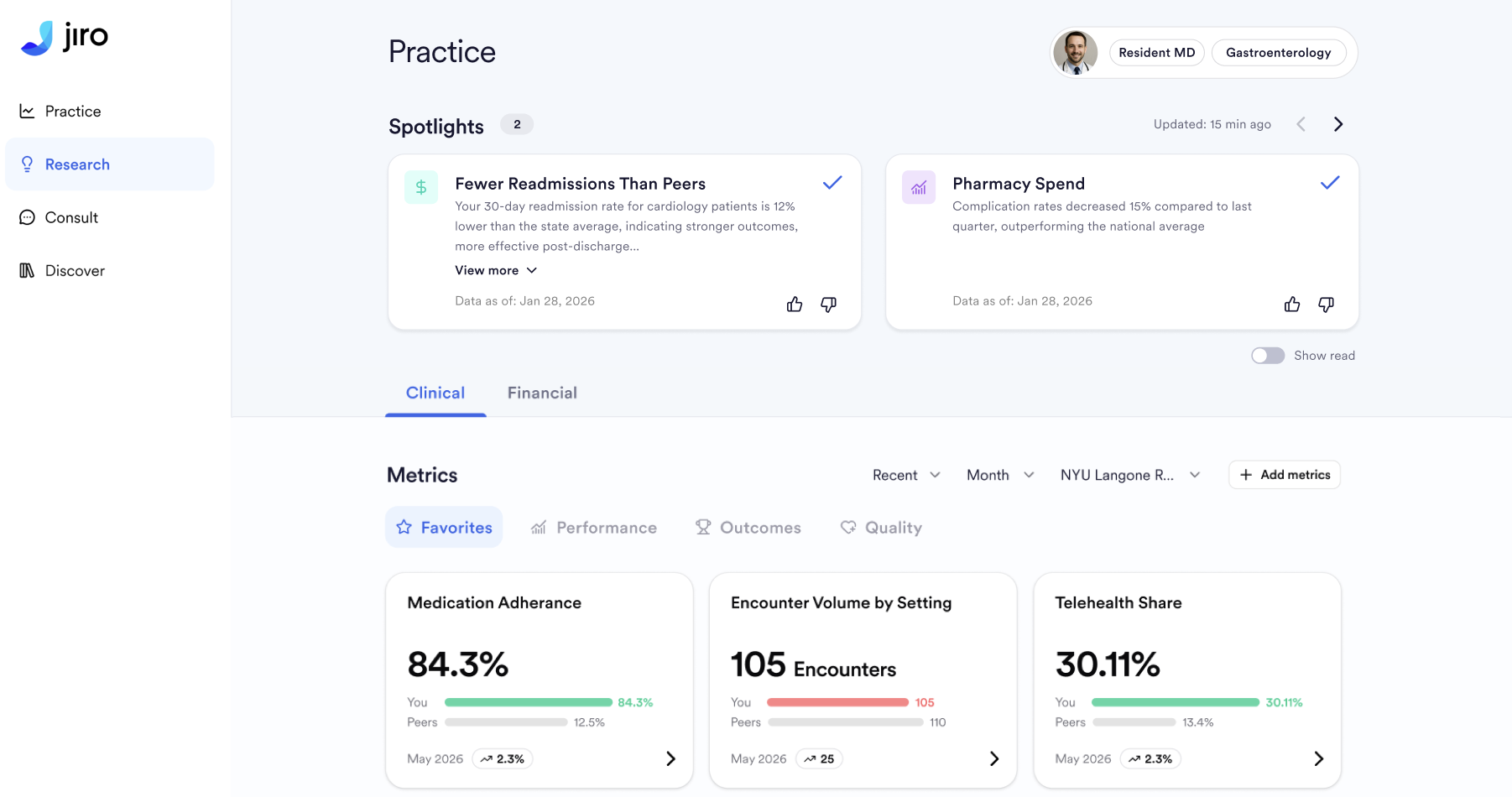
Within that default set, metrics are calculated from your attributed patient panel. You see your own numbers , not aggregate or population-wide figures, benchmarked against peers in comparable practice settings.

How Spotlights Are Generated
Spotlights surface meaningful changes and patterns in your practice data, automatically, without any configuration required, highlighting your significant Metrics for you as new data becomes available.
The Spotlights algorithm evaluates your metrics across multiple dimensions, including patient demographic stratifications such as age, diagnosis cohort, and payer type, to identify where significant shifts or patterns exist. Spotlights are filtered to those most relevant to your active metric set and selected to provide variety across metric categories over time, so the same area of your practice is not surfaced repeatedly.

How Peer Benchmarks Are Constructed
Every metric in Jiro is accompanied by a peer benchmark, a reference value calculated from the same real-world data that powers your personal metrics. Benchmark cohorts are defined by your selected specialty so the comparison group reflects physicians practicing in similar clinical contexts.
Because benchmarks are derived from real-world data rather than survey responses or self-reported figures, they reflect actual practice patterns across the physician population. The benchmark for any given metric represents the distribution of values among your peers, giving your metrics context that would otherwise require external research to obtain.
Benchmarks are not evaluative. They are a reference point for your own interpretation.
How Personalization Adapts To Data Coverage
The depth of personalization Jiro provides depends on how much of your clinical activity is captured in the real-world dataset. Coverage varies based on your geography, payer mix, and practice setting.
When data coverage is high, Jiro delivers fully personalized metrics calculated from your attributed patient panel, with peer benchmarks specific to your specialty and facility.
When coverage is lower, for physicians in markets where data is less complete, or for physicians whose historical activity is still being indexed, Jiro adjusts the level of personalization rather than displaying empty or potentially misleading data. In these cases, the platform falls back to specialty-level signals, which are less specific to your individual practice but still clinically relevant.
For physicians with no data available, for example, residents or newly licensed practitioners, Jiro provides specialty benchmarks and non-personalized Research cards while data coverage builds over time.
How Consult Is Personalized
Consult draws on the same real-world data that powers the Practice tab to contextualize its responses. When relevant, Consult incorporates patterns from your attributed patient population, such as payer mix, diagnosis distribution, or treatment patterns, to provide responses grounded in data specific to your clinical context rather than generic population-level evidence alone.
The degree of personalization in Consult responses depends on data coverage in the same way as Practice metrics: where coverage is high, responses can draw on your specific panel; where coverage is limited, responses rely on specialty-level or broader population data, with appropriate caveats noted inline.
Important To Remember
- Specialty is assigned at registration based on your selection. If your specialty is incorrectly chosen, or if you practice across multiple specialties, make sure to edit your specialty in the Profile page.
- Jiro personalization does not use data you enter into any external system, including your EHR or practice management software. All personalization is derived from real-world data.
- Attribution logic and benchmark methodology follow established industry standards, including HEDIS, CMS, and AHRQ frameworks, adapted for the data available in the Jiro dataset.