
Insights: Overview
Your Jiro source for surfaced hidden patterns in your practice.
- What Insights Are
- What You Can Do With Insights
- Key Features
- How it Works
- Data Sources & Refresh Cadence
- Limitations
- Troubleshooting
- FAQs
- Related Articles
Insights uses AI anchored in deep clinical knowledge to proactively find hidden patterns in care delivery, patient outcomes, and population trends. This article explains what Insights are, and how to use them to learn about potentially hidden patterns in your practice.
At a Glance
- Surfaced trends from your NPI data
- Comparison to your peers
- CME-eligible activity
- Actionable guidance on next-steps
- Notifications when new Insights are published
1. What are Insights?
Rather than spending time manually reviewing numbers across different dashboards, Insights surfaces what matters most to you automatically and brings them to your attention.
By analyzing longitudinal medical data through a clinician-centric lens, Jiro Insights helps you detect critical shifts earlier, personalize care strategies, and ensure you and your facility aligns with the highest clinical standards.
[Image or GIF of clicking and entering Insights here]
2. What You Can Do With Insights
Compare Against Your Peers
Understand how your practice patterns compare to peers in your specialty and region through comparative statistics.
View Treatment Trends
Stay informed on treatment trends and outcomes without having to dig through raw data yourself.
Identify Shifts
Notifications alert you of changed in your patient population before they become larger issues.
Drive Efficiency and Revenue
Identify bottlenecks in clinical workflows, surface cost-saving opportunities, and understand you referral patterns in or out-of-network.
Earn CME Credit
Viewing Insights earn you CME credits at a rate of .25 PRA Category 1 Credits per Insight.
Earn Jiro Rewards
...(find the rates)
Insights is designed to help you practice smarter, not harder. The goal is to put actionable and novel observations in your hands so you can provide the best care for your patients.
3. Key Features
The Insights feature in practice management platforms serves as a proactive, AI-driven intelligence layer that uncovers remarkable performance patterns and provides deep clinical and operational context beyond standard metrics.
| Feature | What it Does |
|---|---|
| Personalized Insights | Insights contextualizes raw data within your patient’s journeys via longitudinal data, identifies deviations from standard protocols, finds gaps in follow-up care, and can isolate specific factors behind a metric. |
| AI-Powered analytics | Our AI engine analyzes large volumes of clinical data using machine learning, bringing hidden patterns to you. |
| Actionable Guidance | Insights are often prioritized by "decision proximity", surfacing data that is within 1-2 steps of a clinical decision. |
| Deep-Dive view | Click on any Insight card to see a detailed breakdown, including the supporting data, methodology, and evidence behind the finding. |
| Peer comparisons | See how your practice benchmarks against physicians in similar specialties and job titles across national, state, and facility levels. |
| Trend detection | Get notified when meaningful trends emerge in your data such as changes in treatment utilization or patient demographics. |
| Bi-weekly data refresh | Insights are updated at least every two weeks. |
| Unread indicators | A badge in the navigation bar shows you how many new Insights are waiting for you. |
[Add image or gif of scrolling through an insight card]
4. How It Works
Step 1: Data Collection
When you join Jiro, your NPI triggers a data pipeline. It pulls relevant claims data and practice information associated with you.
Step 2: Data Validation & Preparation
Your data goes through quality review and is checked for completeness.
Step 3: Transformation & Harmonization
Raw data is standardized and mapped to a common clinical data model for fast processing.
Step 4: AI Analysis & Intelligence Generation
Machine learning analyzes data to identify patterns, trends, and signals. De-identified peer data may be used for comparisons.
Step 5: Prioritization & Guardrails
Insights are designed to be 1-2 steps from a clinical decision. Guardrails ensure they're relevant to you.
Step 6: Output & Delivery
Findings appear as readable Insight cards in your dashboard, explaining what was found, its importance, and supporting data.
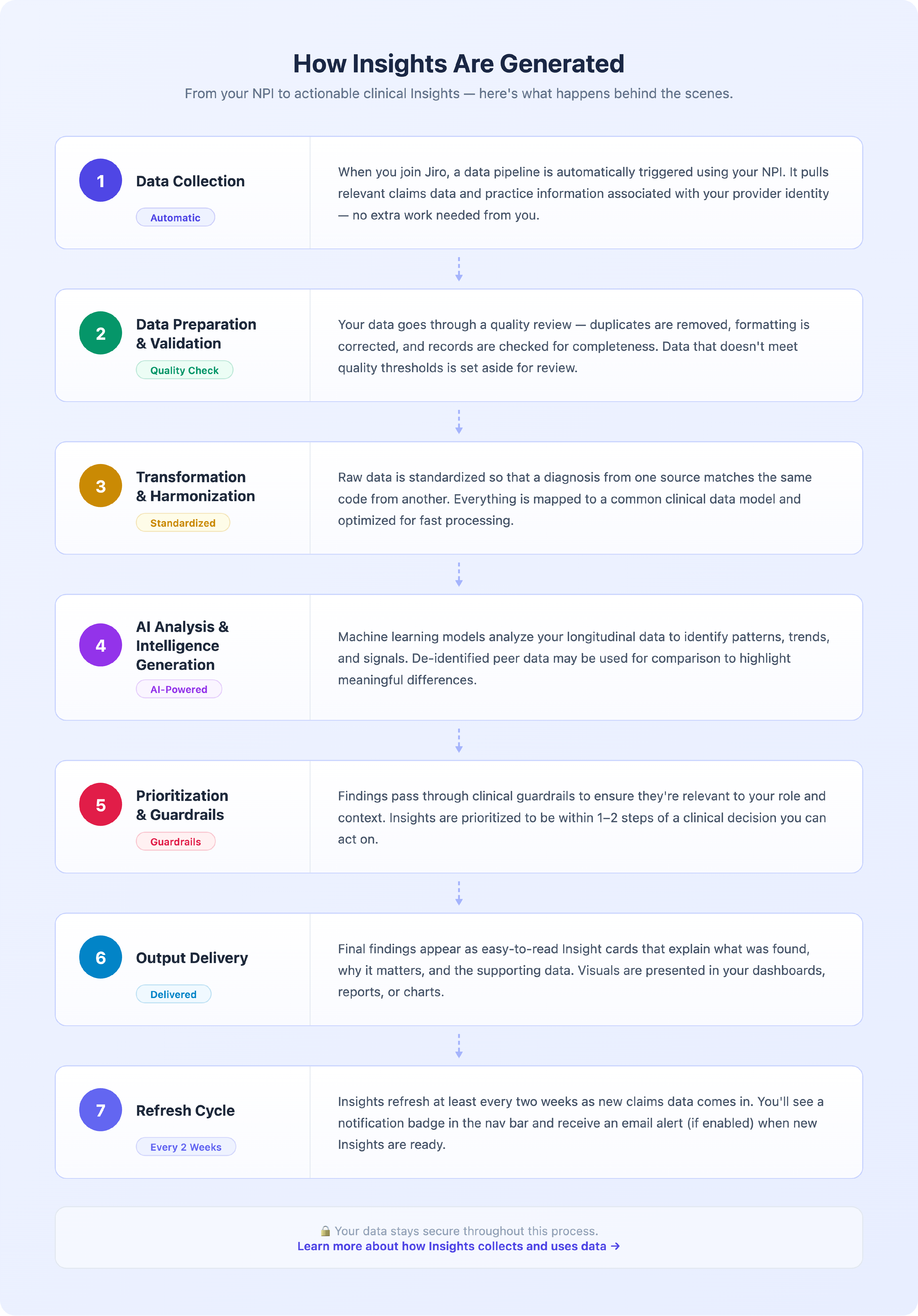
To learn more about how Insights collects and uses data, see this article: [insert article link]
5. Data Sources & Refresh Cadence
Where The Data Comes From
- Medical claims data tied to your NPI
- De-Identified peer data
How Often It Updates
- Insights are updated on a bi-weekly basis
Known Gaps or Delays
- Claims data has a lag of 30-90 days
6. Limitations
- Statistical patterns cannot definitively prove causation
- Insights may not reflect clinical changes made in the last 2 months due to claims data lag
- If critical clinical details aren't captured in data, AI cannot provide Insights on those protocols
- Peer comparisons may not be available if data is not sufficient on both sides
- Having limited data availability may result in Insights not appearing
- AI is restricted to referencing clinical protocols from an Explicit Allowed Protocol Sources List
- A significant break in a trend or absolute minimum change must occur for an Insight to surface
Always use your clinical judgment when reviewing Insights.
7. Troubleshooting
| Issue | What to Do |
|---|---|
| My Insights tab is empty | It can take a few hours for your data pipeline to complete after signup. If your Insights are still empty after 24 hours, please contact support. |
| An Insight seems incorrect | Click the feedback button on the Insight card to flag it. Our team reviews flagged content and will investigate inaccuracies. |
| I don't see any peer comparison data | Peer comparisons require sufficient data from physicians in your specialty and region. |
| My Insights haven't updated in a while | Insights refresh at least every two weeks. If it has been longer than 2 weeks since your last update, please contact support. |
| I received an email about an Insight but can't find it | Ensure you're logged into the correct account linked to your NPI. If you cannot find it, contact support. |
8. Frequently Asked Questions
How is my data kept private & secure?
Your data is handled in full compliance with HIPAA. All data is encrypted in transit and at rest.
How are “peers” defined in My Peer Comparisons?
Peers are physicians who share similar specialty classifications, geographic region, and where possible, training and job level.
Why do I see fewer Insights than I expected?
If your practice is newer, or your claims history is limited, some Insight types may not yet generate for your profile.
What is the difference between Insights and Spotlights?
Spotlights highlight specific, curated data points about your practice. Insights are broader, AI-generated findings that identify patterns and trends across multiple data points.
How do I give feedback on an Insight?
Each Insight card has a feedback option. You can flag an Insight as incorrect, unclear, or not relevant. Our team reviews all feedback and uses it to improve Insights.
Will Insights be available at launch for all physicians?
At launch, our goal is to have at least 3 meaningful, differentiated Insights available per NPI.
How do I know if an Insight is based on sufficient data?
Each Insight card includes a drill-down view, where you can see how it was generated and data volume.
9. Related Articles
10. Version History
Updated: 03/09/2026
Reviewed by: [Name, Title]
Approved by: [Name, Title]